
Article by: Kyle Tryon(読了時間:10分)
あなたはロギングのレベルを一段引き上げ、クエリや集計ができるようにし、本番環境のデバッグに使える、より価値の高い構造化ログを送れるようにしたとします。さて……では、実際にそれをどう書けばいいのでしょうか。
何をログに残すべきかについては、すでに取り上げましたし、これまでに何度か触れてきたので、ここではふれません。
要約:コードの実行に合わせて、デバッグに役立つコンテキストを集め、意味のある節目で wide-event ログを出力しましょう。成功パスと失敗パスのどちらでも、必ず最終的な結果イベントを出力する。
本記事で取り上げるのは、それらのログを実際にどのように書くかについて、次のような問いに答えていきます。
- ログは実際、どのような形であるべきか。
- クエリやフィルタリングに役立つものにするにはどうすればよいか。
- 自分が書くログが、デバッグや、何が起きたのかの把握に役立つとどうすれば分かるのか。
ログを構造化されたものにするのは、単にメッセージを任意の JSON オブジェクトと組み合わせることではありません。そうではなく、ログを実際のアプリケーションデータのように扱います。大きな傾向を把握し、個別のインシデントをデバッグするために、検索・フィルタリング・集計できる必要があるデータとして扱うのです。それらのログを実際にどう書くと選ぶかが、デバッグや何が起きたのかの把握にとってのログの有用性を大きく左右します。
以下は(Sentry の Logs ユーザーと関わり、ロギングからより多くを引き出す手助けをしている立場からの)構造化ログの書き方の一例についての、かなり主観の強いガイドです。
構造化ログの形
どの規約を採用するかそのものよりもそれが予測可能で、一貫して適用されているかどうかのほうが重要です。いったんパターンを定めてそれを守り続ければ、システム内のどのイベントも、そのログメッセージと属性をもとに見つけ出し、理解できるようになるはずです。
私が自分のプロジェクトで使っている規約は次のようなものです。
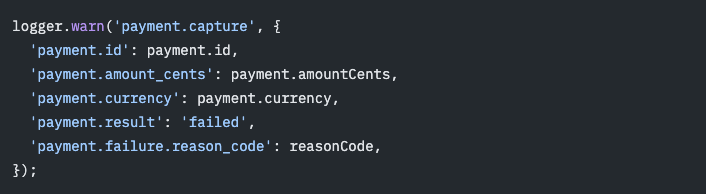
上の例で気づくいくつかのパターンを、以下で詳しく説明していきます。
- イベント名は、
domain.actionという予測可能なパターンを使う。 - 使っているプログラミング言語やフレームワークに関係なく、各セグメントは
snake_caseにする。サービス全体で1つの命名規則にそろえておくと、後々のクエリが格段に楽になる。 - 属性オブジェクトは、ネストされたオブジェクトではなく、ドット記法を使ってフラットにする。
- 可視化やグループ化のために、
succeeded、failed、retried、canceled、completedといった低カーディナリティの値を持つ、予測可能なresult属性を用意する。 - 想定内の、あるいは回復可能な失敗には、warning のログレベルを使う。
- 属性には、プリミティブ値か、プリミティブ値の配列のみを含めるべきである。浅いものも含め、オブジェクトやオブジェクトの配列は入れない。
ESLint でログのパターンを強制する
私は個人的な ESLint プラグインを使っていて、自分の TypeScript プロジェクト全体でこれらのパターンを一貫して守れるようにしています。これは Sentry 公式のプラグインではありません。あくまで私の主観的なガイドラインであり、特定のロギングライブラリに依存しない形で、ログの形をゆるやかに強制する方法です。たとえば zod のスキーマ検証のようなところまでは踏み込みません。
私のパターンに沿って進めたい場合は、以下のプロンプトを使って、私のルールをあなたのプロジェクトにインストール・設定してください。少し違うやり方をしたい場合は、あなた自身のパターンを強制するために、あなたの言語向けの ESLint プラグイン、あるいは同等の lint/ツールを自作することを強くおすすめします。必要なものは何であれ、あなたのエージェントやアシスタントが作成を手伝ってくれます。次のプロンプトを実行して、使っている言語やフレームワークに合わせて、自分だけのルールをカスタマイズしてみてください。
[エージェント支援・言語非依存のカスタム Lint セットアップ]
You are helping design and instrument lint rules that enforce structured logging conventions in this repository.
Goal:
Analyze how this repo logs today, propose lint rules that match its language and tooling, confirm the rule set with the user, then instrument only what they approve.Do not install packages, edit configs, or write rule code until the user explicitly confirms the final rule list and lint tooling in Phase 4.
## Phase 1 — Repo and lint tooling
Inspect the repository before proposing anything.
Determine:
– Primary language(s) and framework(s)
– Package manager / build system (package.json, Makefile, Cargo.toml, pyproject.toml, go.mod, etc.)
– Existing lint, format, and static-analysis tooling already wired into scripts or CI
– How lint is invoked today (npm scripts, make targets, pre-commit, CI jobs)Prefer extending the repo’s existing lint toolchain. Only suggest new tooling when nothing suitable exists for the language.
Report findings briefly before moving on.
## Phase 2 — Logging inventory
Find how this repo actually logs.
Determine:
– Logger API(s) in use (console, custom logger wrapper, SDK logger, framework logger, etc.)
– Call shape: message-first vs attributes-first, level methods, shared context helpers
– A representative sample of existing log calls across the codebase (not just one file)Infer conventions already present. Stay open to whatever this repo actually does. Look for things like:
– Consistent message formatting (templates, prefixes, event labels, free-form text)
– How structured data is attached (second argument, context helpers, key/value pairs, none)
– Naming and casing habits for messages and attribute keys
– What kinds of values get logged (primitives, objects, errors, request/response payloads)
– Recurring fields (ids, status/result, counts, error codes) and how severity levels are chosen
– Whether context is attached or propagatedSeparate observed conventions from aspirational ones. Prefer rules that encode patterns already used in the repo unless the user asks to migrate toward a new convention.
Report the logger API, call shape, and any recurring conventions with 2–4 short examples before moving on.
## Phase 3 — Rule discovery with the user
Propose candidate lint rules one at a time based on Phases 1–2 findings.
Prefer rules that encode conventions already visible in this repo.
If the inventory shows little consistency, propose a small starter set and ask which direction the user wants to move toward.For each candidate:
1. Name the rule
2. State what it would reject and what it would allow
3. Show one valid and one invalid example using this repo’s logger API
4. Ask whether to adopt it as-is, modify it, or skip itDerive candidates from what you found. Typical areas to consider, only when relevant:
– Message formatting consistency
– Attribute or structured-data shape and key naming
– Inline attributes vs helpers / spreads
– Allowed attribute value types
– Required contextual fields on certain event typesIf the user wants stronger structured-logging conventions than the repo currently uses, you may offer optional ideas such as stable event names, scoped dotted keys, primitive-only attributes, or a low-cardinality result/status field. Treat those as suggestions, not defaults.
Do not invent rules the repo’s linter cannot reasonably enforce. If a desired check needs type information, schema validation, or domain judgment, say so and offer a weaker lintable version or leave it as a review guideline.
Wait for the user’s answer on each rule before finalizing the list.
## Phase 4 — Confirmation gate
Before instrumenting, present a confirmation summary:
– Lint tooling that will be used or extended
– Exact rule names to add
– Severity recommendation (prefer warn for first adoption unless the user wants error)
– Config files and packages expected to change
– Any limitations (for example non-type-aware false positives)Ask the user to confirm or edit that list. Do not proceed until they confirm.
## Phase 5 — Instrument
Only after confirmation:
– Add or extend lint rules using the approved tooling
– Preserve existing lint config shape, ignores, parsers, and unrelated rules
– Wire rules into the repo’s existing lint command / CI path when practical
– Run the smallest relevant lint scope and fix config errorsValidation:
– Confirm the new rules load without config errors
– Report packages and config files changed
– Show one valid and one invalid example per enabled rule in the final report; do not add intentionally invalid example code to the repo
– Call out any follow-up migration work if existing logs will now warn or fail
私の ESLint プラグインをインストールするには、次のプロンプトを AI アシスタントに渡してください。
[エージェント支援・@techsquidtv/eslint-plugin-structured-logging のセットアップ]
You are helping install and configure a structured logging ESLint plugin in this repo.
Goal:
Install and configure @techsquidtv/eslint-plugin-structured-logging.
Scope:
– Work with the repo’s existing package manager.
– Preserve the repo’s current flat config shape, parser settings, plugins, ignores, file globs, and unrelated rules.
– Do not migrate the project to a different ESLint config style unless that is explicitly requested. If the repo still uses a legacy ESLint config, stop and explain that the plugin documents flat config; ask whether the user wants to handle that migration as a separate prerequisite.
– Choose rule severity independently from strict attribute-value checking. Recommend `warn` for first-time adoption, or `error` when schema violations should fail CI.
– Separately ask whether the repo wants syntax-conservative attribute checking. Explain that `disallowUnknownAttributeValues: true` rejects identifiers and member expressions such as `payment.id` because the plugin does not use type information, even when those expressions produce primitive values at runtime. Recommend leaving it `false` for most projects.
– If ESLint is not already installed or configured, stop and ask the user if they want to proceed by first installing and configuring ESLint before continuing with the plugin installation.
Steps:
– Import the plugin as structuredLogging from @techsquidtv/eslint-plugin-structured-logging.
– Prefer explicit per-rule configuration over structuredLogging.configs.recommended, so this repo can tune each rule as it follows the prompts below.
– Use the explicit per-rule config shape shown later in the article: register the plugin once, define shared loggerOptions, and pass those options to each structured logging rule.
– Register the plugin with the “@techsquidtv/structured-logging” key.
– Inspect representative logger calls before defining shared loggerOptions. Configure only the logger identifiers, object paths, and complete level-method list the repo actually uses. Add a logger to an attributesFirst option only when its calls use `(attributes, message)`; leave message-first loggers using `(message, attributes)` out of those arrays.
– Define shared loggerOptions once, then pass them to each structured logging rule.
– Configure the four recommended rules explicitly: @techsquidtv/structured-logging/require-logger-message, @techsquidtv/structured-logging/require-logger-scoped-dot-notation, @techsquidtv/structured-logging/require-logger-inline-attributes, and @techsquidtv/structured-logging/require-logger-primitive-attributes.
– Set messageFormat: “dotted-snake-case” and attributeKeyFormat: “dotted-snake-case” on require-logger-scoped-dot-notation.
– Use the selected `warn` or `error` severity for all four rules.
– Set disallowUnknownAttributeValues: true on require-logger-primitive-attributes only if the user explicitly chose syntax-conservative attribute checking after reviewing its limitations. Otherwise, leave it false even when the rule severity is `error`.
– Keep unrelated lint rules unchanged.
Validation:
– Run the repo’s ESLint command on the smallest relevant scope.
– Confirm the structured logging rules load without config errors.
– Report the exact package and config files changed.
– Report any compatibility blockers or follow-up needed.
安定したイベント名を使う
まずは、良くないログがどのようなものかを見てみましょう。

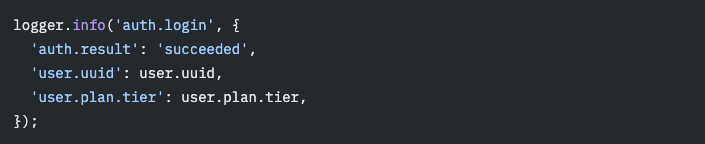

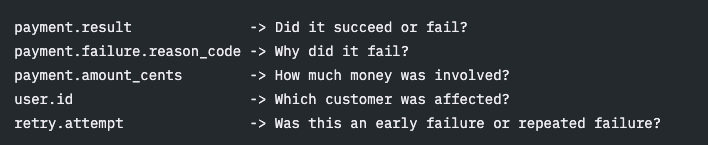

その isolation scope が有効な間に出力されるすべてのログは、同じ auth.* の属性を受け取ります。追加するのは、意図的でポリシー上承認された値だけにしてください。共有コンテキストは広く伝播するものであり、機密データの収集を防ぐための安全装置ではありません。
ログ自体には、最終的に起きた「action」を詳しく表、属性をデバッグに役立ちそうな取得できるその他の有用な情報とともに記録します。これには通常、そのアクションの result(結果)と、そこに至るまでのアプリケーションの状態が含まれます。
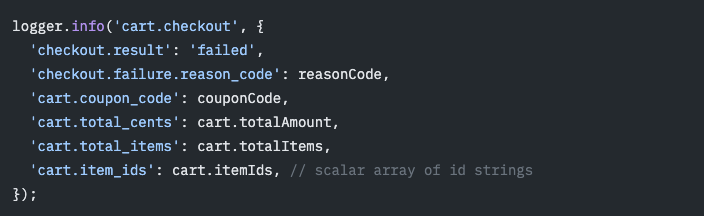
スコープ付きの属性キーを ESLint で強制するには、属性キーのルールを次のように設定します。
[エージェント支援・属性キーの Lint 設定]
You are helping configure ESLint for structured logging in this repo.
Goal:
Enforce scoped, dotted-snake-case log attribute keys with @techsquidtv/eslint-plugin-structured-logging.
Scope:
– Work in the existing ESLint flat config. If the repo uses a legacy config, stop and report that prerequisite instead of migrating it as part of this task.
– Preserve the repo’s current config shape, parser settings, plugins, ignores, and rule style.
– Reuse shared loggerOptions if this repo defines them for other structured logging rules.
– Preserve messageFormat: “dotted-snake-case” if this repo already uses the same rule for event names.
– Detect whether logger calls are message-first or attributes-first, and preserve custom logger identifiers, object paths, level methods, and dynamic level matching.
Steps:
– Confirm the initial setup is complete and the structured logging plugin is available. If it is not, stop and refer to the setup prompt rather than repeating installation work here.
– Configure @techsquidtv/structured-logging/require-logger-scoped-dot-notation with attributeKeyFormat: “dotted-snake-case”.
– Preserve messageFormat if it is already explicitly configured. Otherwise, set messageFormat: “off” so this attribute-key task does not silently enable the rule’s default event-name check.
– Preserve the repo’s existing severity unless the user explicitly requests `warn` or `error`. Do not change unknown-value handling merely because severity changes.
– Keep unrelated lint rules unchanged.
Validation:
– Run the repo’s ESLint command on the smallest relevant scope.
– Show one valid attribute-key example and one invalid example in the final report. Do not add intentionally invalid example code to the repo.
– Report the exact config file changed and any follow-up needed.
イベントの属性はインラインに保つ
スプレッド構文やヘルパーはログの一貫性を高めてくれますが、それらはたいてい、すべてのイベントログの内側ではなく、コンテキストの境界に置くべきものです。
「auth.org_id」「auth.user_tier」「flags.name」のような共有のコンテキスト属性は、多くのログで役立つことがよくあります。それらをすべてのイベントログにスプレッドで展開するのではなく、ロガーのコンテキスト機構を通じて設定しましょう。Sentry の場合は、先ほどの isolation scope のパターンを使います。こうするとイベントの属性は明示的なまま保たれますが、共有される値はどれも伝播される前にプライバシーと保持期間のレビューを受ける必要があります。
ほとんどの属性はイベント自体を表し、そのイベントの名前空間を使うべきです。周辺のコンテキストの名前空間はイベントの説明・フィルタリング・調査に実質的に役立つときにだけ、少数を追加しましょう。属性をインラインに保つことで、ログイベントをそれが発生した場所でレビューしやすくなり、未知の属性が紛れ込むのを防ぎやすくなり、そしてログイベントが自己完結していて理解しやすいものになります。
これは避けましょう。
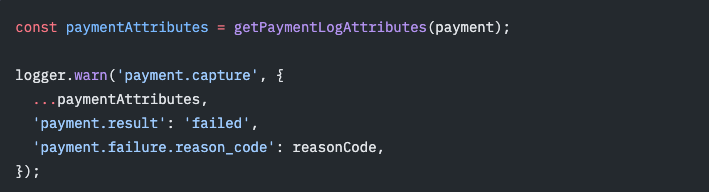
私は一貫性を保つためにこのルールを守っていますが、共有属性やヘルパーを使ってログに属性を付与すること自体が、本質的に間違っているというわけでは必ずしもありません。ただ、一貫性を保ち、何をログに残しているかに気を配る必要があるだけです。スキーマ検証ツールを使っているなら、これはさほど心配することではなくなります。
明示的な属性を ESLint で強制するには、インライン属性のルールを次のように設定します。
[エージェント支援・インライン属性の Lint 設定]
You are helping configure ESLint for structured logging in this repo.
Goal:
Require logger attributes to be explicit inline object literals with @techsquidtv/eslint-plugin-structured-logging.
Scope:
– Work in the existing ESLint flat config. If the repo uses a legacy config, stop and report that prerequisite instead of migrating it as part of this task.
– Preserve the repo’s current config shape, parser settings, plugins, ignores, and rule style.
– Reuse shared loggerOptions if this repo defines them for other structured logging rules.
– Detect whether logger calls are message-first or attributes-first, and preserve custom logger identifiers, object paths, level methods, and dynamic level matching.
Steps:
– Confirm the initial setup is complete and the structured logging plugin is available. If it is not, stop and refer to the setup prompt rather than repeating installation work here.
– Configure @techsquidtv/structured-logging/require-logger-inline-attributes if it is not already configured.
– Preserve the repo’s existing severity unless the user explicitly requests `warn` or `error`. Do not change unknown-value handling merely because severity changes.
– Reject prebuilt attribute objects, helper-returned attributes, object spreads, and computed keys in logger calls.
– Keep unrelated lint rules unchanged.
Validation:
– Run the repo’s ESLint command on the smallest relevant scope.
– Show one valid inline logger call and one invalid spread or prebuilt-attributes example in the final report. Do not add intentionally invalid example code to the repo.
– Report the exact config file changed and any follow-up needed.
プリミティブな属性値を使う
構造化ログが最も役立つのは、属性がクエリ・フィルタリング・グループ化・集計しやすいときです。ロギングバックエンドが予測可能な形でインデックスし検索できるように値をフォーマットすることから始まります。
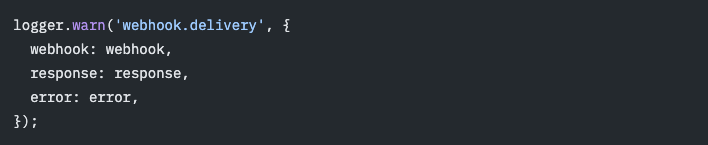
フラットな属性キー構造とあわせて、私は属性値をプリミティブに限定するのを好みます。文字列、数値、真偽値、そしてそれらプリミティブの配列です。
このプラグインはインラインのオブジェクトリテラルやオブジェクトの配列のように、ソースコード上で見るからにプリミティブでない値は、常に拒否できます。デフォルトの型情報を使わない挙動では、識別子やメンバー式など、実行時の型が不明な式は許可されます。disallowUnknownAttributeValues を有効にすると、そうした不明な式も拒否されるようになるため、このオプションは通常の動的な値に対して生じる誤検知をプロジェクトとして意図的に受け入れる場合にのみ使ってください。
生のオブジェクトをそのままログに残すのは完全な詳細が保たれるため、デバッグ時には魅力的に思えます。しかしたいていはクエリ上の価値がほとんどないまま、ノイズとコストを増やすだけです。ネストされたオブジェクトは、コードパスによって形が大きく変わります。オブジェクトの配列はさらにたちが悪く、ログ行のサイズを爆発的に膨らませかねないうえに、それでいて検索しづらいのです。
これは避けましょう。
こちらを使いましょう。
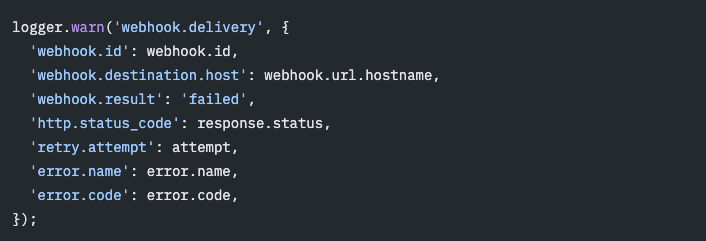
これにより、実際にクエリできるフィールドが得られます。

数値を扱うときは、属性名に単位を含めておくとよいでしょう。
size は曖昧です。size_bytes は役に立ちます。また、amount は曖昧です。amount_cents は役に立ちます。
世の中の構造化ログの例の多くは、ログイベント上に所要時間のデータを載せています。Sentry のようなトレーシングプロバイダーを使っているなら、ログの中で操作の所要時間を手作業で計測するのは避け、代わりにカスタムスパンを実装すべきです。操作の所要時間を計測するのにふさわしい領域はTracingです。Sentry ではログがトレースに接続されているため、ログを関連するスパンと簡単に関連付けられます。
値に関するガイドライン
- 文字列、数値、真偽値、そしてそれらの値の配列を使う。
- オブジェクトは、クエリする少数のフィールドへとフラットにする。
- 数値の属性名には単位を含める。
- 所要時間やタイミングのフィールドはログに残さず、それらはスパンに載せる。
- request、response、user、payment、error のオブジェクトを丸ごとログに残さない。
- 配列にはとりわけ注意する。文字列の配列はたいてい問題ないが、オブジェクトの配列はたいてい問題がある。
プリミティブな値を ESLint で強制するには、プリミティブ属性のルールを次のように設定します。
[エージェント支援・プリミティブ属性の Lint 設定]
You are helping configure ESLint for structured logging in this repo.
Goal:
Require primitive log attribute values with @techsquidtv/eslint-plugin-structured-logging.
Scope:
– Work in the existing ESLint flat config. If the repo uses a legacy config, stop and report that prerequisite instead of migrating it as part of this task.
– Preserve the repo’s current config shape, parser settings, plugins, ignores, and rule style.
– Reuse shared loggerOptions if this repo defines them for other structured logging rules.
– Detect whether logger calls are message-first or attributes-first, and preserve custom logger identifiers, object paths, level methods, and dynamic level matching.
Steps:
– Confirm the initial setup is complete and the structured logging plugin is available. If it is not, stop and refer to the setup prompt rather than repeating installation work here.
– Configure @techsquidtv/structured-logging/require-logger-primitive-attributes if it is not already configured.
– Preserve the repo’s existing severity unless the user explicitly requests `warn` or `error`.
– Treat severity and unknown-value handling as separate choices. Use disallowUnknownAttributeValues: true only when this repo intentionally wants syntax-conservative enforcement that rejects identifiers and member expressions without type information; otherwise leave it false, including when the rule severity is `error`.
– Keep unrelated lint rules unchanged.
Validation:
– Run the repo’s ESLint command on the smallest relevant scope.
– Show one valid primitive-attributes example and one invalid object-literal or array-of-objects example in the final report. Do not add intentionally invalid example code to the repo. If discussing a variable such as `error`, explain that it is rejected only when disallowUnknownAttributeValues is true.
– Report the exact config file changed and any follow-up needed.
リンターで一貫性を保つ
パターンが見つかったら、それをリンターで強制しましょう。これは、ログが有用であり続けるように一貫性を保つのに役立つだけでなく、AI エージェントをより賢くもします。リンターを検証ステップとして /goal と組み合わせて使えば、ログの記述や移行を自動化する助けになります。
パターンを導入している間は、warning から始めましょう。チームが CI で強制する準備が整ったら、それらを error に変えます。
フロントエンドとバックエンドで異なる言語を使っている場合は、両側で同じパターンを強制するようにしてください。これも私なら AI に頼んで、自分の ESLint ルールを Python 向けの Flake8 や、他の言語向けの別のリンターに移植してもらう場面の1つです。
リンターはログの形は捕捉できますが、payment.result が本当は checkout.result であるべきかどうかや、インシデント時にいつも必要になる、あの1つのフィールドがイベントから欠けていないかどうかまでは判断できません。
そのためには私たちのルールとガイドラインを踏まえてログをレビューし監査してもらうよう、AI エージェントにプロンプトを使うことができます。ここでも、/goal コマンドとともにリンターを使えば、さらに良い結果を得られます。
これらのルールでログをレビューするには、次のプロンプトを使います。
[エージェント支援・ログスキーマのレビュー]
You are reviewing structured logger calls after they pass @techsquidtv/eslint-plugin-structured-logging.
Goal:
Improve the domain quality of structured logs without changing their mechanical schema unless needed.
Scope:
– Read-only review: do not modify files, configs, dependencies, or generated output.
– Review only logger calls and nearby context needed to understand the event.
– Do not rename fields casually. Prefer names that match nearby domain language and existing logs.
– Do not suggest logging raw request bodies, response bodies, secrets, tokens, or unnecessary identifiers.
Review checklist:
– Event names that are mechanically valid but vague, surprising, or inconsistent with nearby domains.
– Attribute names that should be renamed for clarity, units, or consistency.
– Values with unsafe cardinality, sensitive data, raw URLs, request or response bodies, or unnecessary identifiers.
– Missing result/status fields that would make grouping and alerting easier.
Output:
– Return file and line references, the suggested rewrite, and a concise reason.
– Call out any field names or values that need product or domain review.
– If the logs already look good, say so briefly and name the strongest remaining risk.
良いログは、次の問いに答える
重要なのは、すべてのコードベースがまったく同じログスキーマを必要とする、ということではありません。重要なのは、すべてのコードベースが良いログとはどのようなものかについての共通の考えを必要とする、ということです。
退屈な規約から始めましょう。安定したイベント名、スコープ付きのキー、意図を持って書かれたイベント属性、そしてバックエンドが検索できるプリミティブな値です。そのうえでリンターが理解できる部分は強制し、ドメインの判断が必要な部分はレビューします。
良いログはコードを書いた本人のための breadcrumbs(手がかり)にとどまりません。次にそのログを見る人が、何が起きたのか、どこで起きたのか、誰または何が影響を受けたのか、そして次にどこを見るべきなのか、という問いに答える助けとなる、小さく一貫した記録です。
FAQ
■ 構造化ログには何を含めるべきか?
構造化ログは、そのイベントに関連するアプリケーションの状態を捉えるべきです。何が起きたか結果を表すクエリ可能な属性に加えて、そこに至るまでに集められたコンテキストです。
■ ログイベントにはどう名前を付けるべきか?
ログイベントには auth.login、payment.capture、webhook.delivery のように、何が起きたかを表す、安定した低カーディナリティの文字列で名前を付けましょう。ユーザー名、ID、金額、エラーメッセージのような動的な値をイベント名に入れるのは避けてください。そうした詳細はログの属性に置くべきものです。
■ 構造化ロギングでは、なぜフラットな属性キーを使うべきか?
payment.result や payment.failure.reason_code のようなフラットでスコープ付きのログ属性キーは、ネストされたオブジェクトよりもクエリやグループ化がしやすくなります。ドット記法は属性を整理された状態に保ちつつ、各フィールドをロギングバックエンドで直接検索できるようにします。
■ ログの属性値はどう選ぶべきか?
そのイベントに至るまでに何が起きたかを理解するのに役立つ、有用なアプリケーションの状態を含めましょう。クエリやグループ化ができるようにしたい主要なディメンションは何かを考えてください。文字列、数値、真偽値、そしてプリミティブの配列を優先しましょう。何がログに残るかをスキーマが厳密に制御している場合を除き、request、response、user、payment、error の生のオブジェクトは避けてください。
■ 構造化ロギングのベストプラクティスは、どう強制すべきか?
ログを一貫して有用に保つために、強制可能なポリシーのセットを備えた言語やフレームワーク向けのリンターを使いましょう。ログの一貫性を保つ助けとして、コンテキストをサポートする高機能なロギングライブラリを使いましょう。
Original Page: How to structure a log
IchizokuはSentryと提携し、日本でSentry製品の導入支援、テクニカルサポート、ベストプラクティスの共有を行なっています。Ichizokuが提供するSentryの日本語サイトについてはこちらをご覧ください。またご導入についての相談は「お問い合わせ」からお気軽にお問い合わせください。